 Ditty
Ditty
The survival guide that works with no signal.
First aid, water, shelter, fire, navigation and signalling — on the phone before you need it, written to be acted on with cold hands, and one tap from launch when minutes matter.
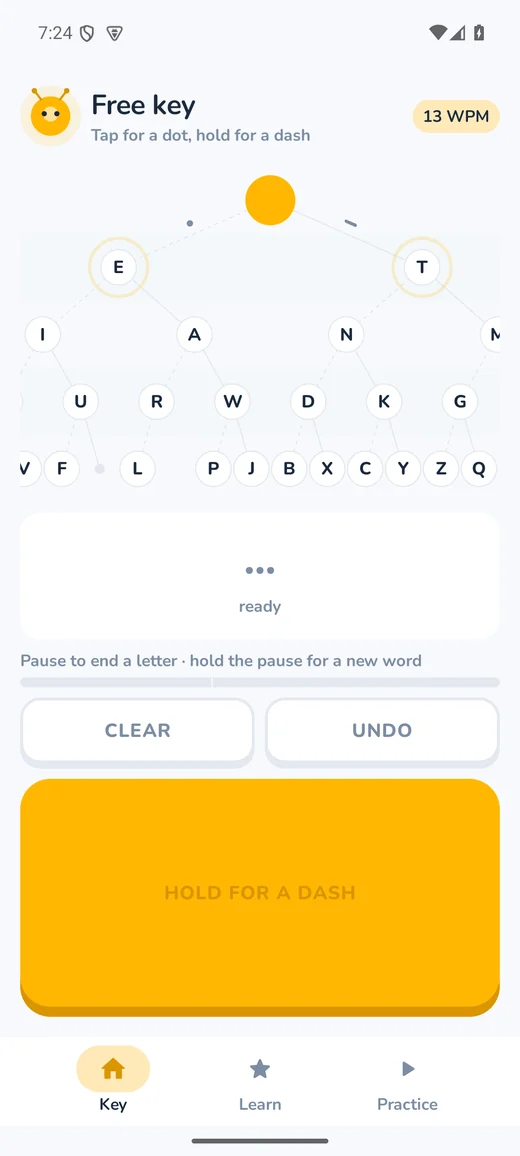
It started as a morse trainer, and the key on the right is the real thing. Try sending SOS: three short, three long, three short.
tap = dot · hold = dasha pause ends the letter
dot goes left dash goes right
The guide
Written for the worst ten minutes, not the best ten years.
The front page leads with the emergencies — severe bleeding, CPR, choking, hypothermia, heatstroke, snakebite, lost, signalling for rescue — and a search box that knows the words people actually type. “Cut” finds bleeding. Steps are numbered and tick off under a thumb, so you can look away, use both hands, and find your place again.
- first aid
- Bleeding, CPR, choking, shock, burns, breaks, heat and cold, bites and stings, allergic reaction, drowning, poisoning.
- out there
- Water, shelter, fire, finding your way in either hemisphere, knots you can tie from the words alone, food, dangerous animals.
- environments
- Cold and snow, desert and heat, jungle, sea and coast.
- at home
- Plans and kits, earthquake, flood, bushfire, storms, heat, power cuts.
- sourced
- Every article lists where it comes from — public-release US Army field manuals and agencies such as the CDC, EPA and FEMA — and when it was last checked. Where an old manual and current guidance disagree, current guidance wins.
Make water safe
How many drops of bleach or iodine for the water you actually have, or how long to boil it — the EPA's figures, with a timer for the wait.
Drills
“Your friend is shivering and slurring: what first?” Short scenarios that come back on a lengthening schedule until the first move is reflex.
Night vision
One switch turns the whole app red on black, so reading it in a tent does not cost you half an hour of dark-adapted sight.
And still a morse trainer
The alphabet and the lesson map are the same shape.
Every morse character is a path of binary choices: a dot goes left, a dash goes right, and how deep a letter sits is how long it is. Characters unlock as the one above them is mastered, so you descend from E and T outwards and learn the structure of morse rather than thirty-six unrelated patterns.
Characters are always sent at full speed with the gaps between them stretched to give you thinking time. That is Farnsworth spacing, and it matters: slowing the characters themselves teaches you to count individual dots, and counting caps most learners at about ten words a minute for good.
The half nobody explains
Most morse apps teach the letters and stop.
Which leaves you able to send thirty-six characters and unable to hold a conversation. Ditty keeps going, into everything that turns letters into contact:
- word gap
- A pause, not a character — seven dot-lengths of nothing. The most common thing beginners never learn.
- · · · · · · · ·
- The error signal. Eight dots meaning “ignore that, here it comes again”.
- AR · SK · K
- Procedure signals: end of message, end of contact, and your turn to talk.
- Q codes
- QTH, QRS, QRZ — the shorthand real operators actually use, plus punctuation.
- a full QSO
- A scripted five-turn contact, from the call to the sign-off, with a partner who waits for you.
Beyond the app
Morse you can use outside Ditty.
Learning it and never using it is how a skill evaporates. So the app opens three doors out of itself.
A morse keyboard
Enable Ditty as a system keyboard and key morse into any app on your phone — a message, a search box, a note. There is no space bar, because a space is a longer pause.
A listening decoder
Point the phone at a practice oscillator, a receiver, or a friend’s key and Ditty reads what it is sending. It finds the tone and works out the sender’s speed on its own.
A signal lamp
Flash a message with the camera light and the whole screen — the one channel that reaches somebody who is not holding your phone.
The signal lamp
Across a room, a field, or a harbour.
Morse survives because it degrades well. When there is no signal, no shared language and no battery for a call, there is still a light that can be switched on and off. Ditty flashes the torch and the screen on the same timeline, at a speed slow enough for a human on the other end to read.
It needs no camera permission — Android's torch control deliberately sits outside the camera permission model, so the app can switch the lamp and cannot see through the lens.
Both halves
Sending and receiving are different skills.
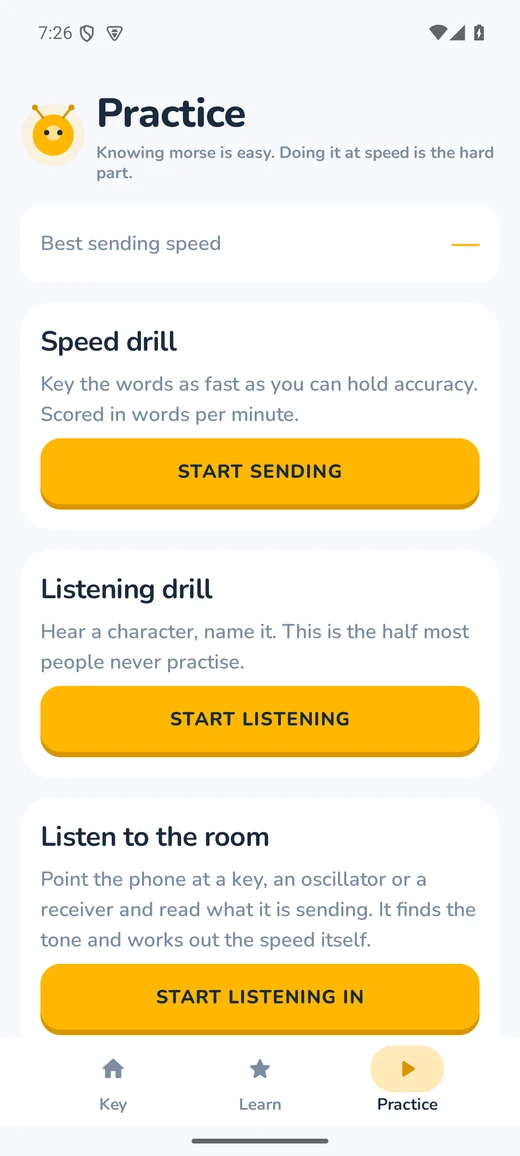
A speed drill scored in words per minute, and a listening drill that plays characters you have to name. The one people skip is receiving, and it is the one that matters for reading somebody else’s morse.
Everything is scored against the PARIS convention, so the number on your screen is the number an operator would recognise.
Ditty 2.0
No account. No tracking. No internet permission at all.
Not a promise — a property you can check. The app’s manifest declares only vibration and, for the listening decoder, the microphone. No location, no camera, no contacts. An Android app cannot open a network connection without the internet permission, and Ditty does not have one.